

Most of us have been there. You finish an essay or a blog post, and you have no idea whether you hit the word limit. Or you suspect you used the same word twelve times. UploadWords.com was built for exactly this kind of quick check.
In this guide, you will learn what the tool does, how to use it, who benefits most, and where its limits are.
What Is UploadWords.com?
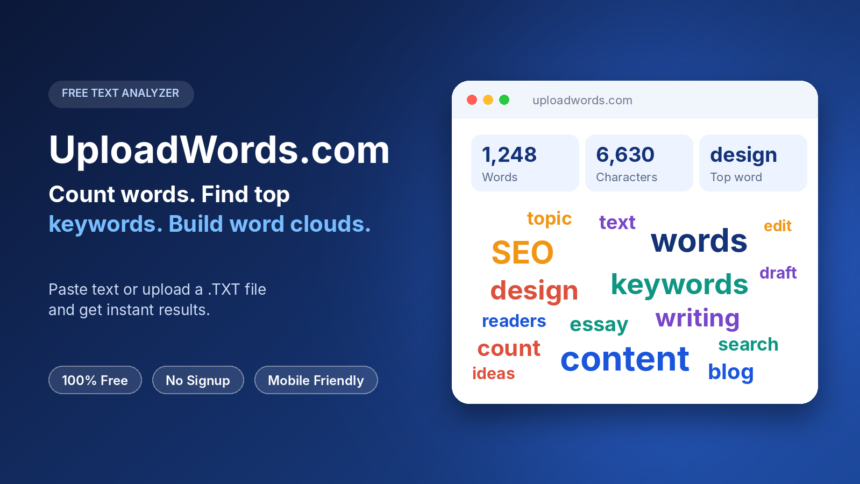
UploadWords.com is a free online text analyzer. You paste your text, or upload a file, and it shows you the numbers behind your writing.
It is not a word game, and it is not a file-hosting service. Some people mix it up with word unscramblers, but those solve letter puzzles. UploadWords looks at text you have already written.
What the Tool Shows You
After you run the analysis, you get three things:
- Word count and character count for your full text
- Top keywords, listed with how many times each one appears
- A word cloud, which is a picture where the most-used words appear larger
Together, these give you a fast read on your length and your repeated words.
How to Use UploadWords.com
The process takes under a minute. There is nothing to install and no account to create.
- Open the tool page.
- Paste your text, or upload a .TXT file.
- Click Analyze.
- Read your results, then copy them or download the word cloud as a PNG image.
That is all. The tool is also mobile-friendly, so you can check a draft from your phone.
Settings That Make Results Cleaner
Two small settings change how useful your keyword list is.
Remove stopwords hides filler words like “the,” “and” and “of.” Without this, your top keywords are often just common connecting words. Turning it on shows the words that actually carry meaning.
Minimum word length lets you ignore very short words. If your results look odd, check these two settings first.
File Types and Size Limits
At the moment, the tool accepts .TXT files only, up to 4 MB. That is plenty for most essays, articles and reports.
If your draft is in Word, copy the text and paste it into the editor instead. The site says DOCX support may come later, but do not count on it yet.
Who Is It Useful For?
The site is aimed at students, writers, bloggers and SEO marketers. Here is how each group can use it:
- Students can check an essay against a word limit before submitting.
- Writers can spot repeated words and tighten a draft.
- Bloggers can see whether the main topic word appears often enough.
- Marketers can review copy before publishing.
Using It for Basic SEO Checks
A keyword frequency list can tell you whether your page is clearly about its topic. If your target phrase never shows up in the top results, your draft may have drifted.
The conversely is also true. If one word dominates the list, the writing may feel repetitive or forced.
Keep expectations realistic, though. UploadWords checks the text you give it. It does not research keywords, track rankings or audit a website.
Is UploadWords.com Safe and Private?
The site says you do not need to sign up, and that it has no ads. It also states that your pasted text is used only to generate your results and is not published.
Its privacy policy adds that some technical data may be collected, such as device type, browser, approximate location and IP address, for security and performance. That is common for websites.
As a sensible habit, avoid pasting passwords, client secrets or private personal details into any online tool. Read the privacy policy yourself if the text is sensitive.
Why People Search for “UploadWords.com USA”
You may see searches like “uploadwords.com usa” or “uploadwords. com” with a stray space. These are mostly variations of the same name.
The official pages present one general, browser-based tool. They do not describe a separate US-only product. If you land on a different site with a similar name, double-check the address before pasting anything.
Limits to Keep in Mind
Every tool has gaps, and it is better to know them early.
- It does not rewrite, grade or fact-check your writing.
- It does not give a readability score.
- Word clouds are visual summaries, so use the keyword table when you need exact numbers.
- File uploads are limited to .TXT for now.
For a quick count and keyword check, these limits rarely matter. For a deep content audit, you will need a bigger tool alongside it.
Final Thoughts
UploadWords.com does one job and keeps it simple. It counts, ranks and visualizes the words in your text, quickly and for free. If you write essays, posts or marketing copy, it is a handy tool to keep bookmarked.
Try it with your next draft, and see which words you lean on most.
Frequently Asked Questions
What is UploadWords.com?
It is a free online text analyzer. It gives you the word count, character count, top keywords and a word cloud from any text you paste or upload.
Is UploadWords.com free to use?
Yes. The site states that it is completely free, with no signup required.
Do I need to create an account?
No. You can open the tool and use it right away.
What file formats can I upload?
Only .TXT files are supported right now, with a maximum size of 4 MB. You can also paste text directly into the editor.
Can I upload a Word (DOCX) file?
Not currently. The site mentions that DOCX support may be added later. For now, copy and paste the text.
Does UploadWords.com store my text?
The site says your text is used only for analysis and is not published. Its privacy policy also notes that basic technical data, like IP address, may be logged for security.
Can I download the word cloud?
Yes. You can save the word cloud as a PNG image or copy the results with one click.
Does it work on mobile phones?
Yes. The tool is mobile-friendly.
Is UploadWords.com a word unscrambler or word game?
No. It analyzes text you already have. It does not solve anagrams or suggest words from letters.
Can it replace a full SEO tool?
No. It is useful for a basic keyword frequency check, but it is not a keyword research or site audit platform.